In an era where entertainment is increasingly centered around the digital experience, the quest for superior picture quality on smart TVs has become paramount. As consumers invest in cutting-edge technology, understanding how to maximize the visual capabilities of these devices is essential. This article delves into the technical intricacies and practical steps necessary to enhance picture quality, offering insights into calibration techniques, optimal settings, and the impact of ambient conditions. By dissecting these elements, we aim to equip readers with the knowledge needed to transform their viewing experience, ensuring that their smart TV performs at its peak potential.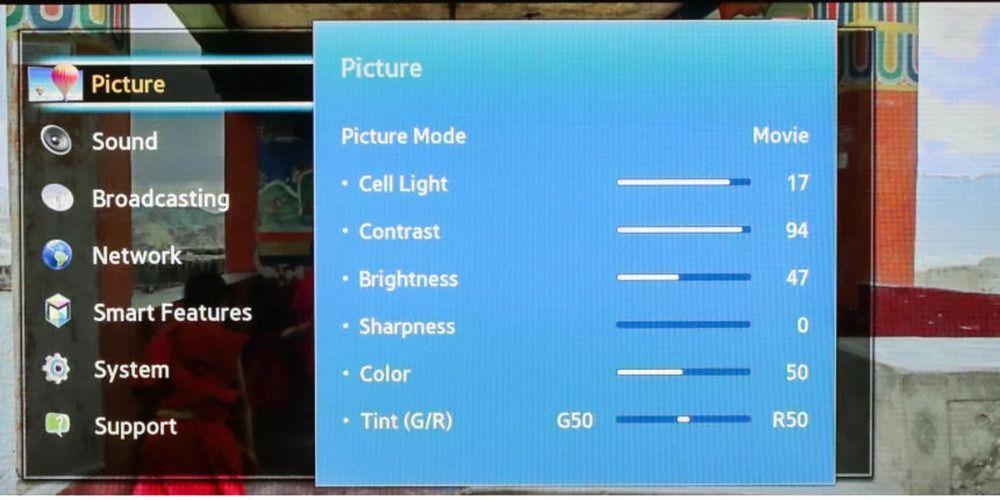
Understanding Display Settings and Calibration
To truly unlock the potential of your smart TV, delving into the intricacies of its display settings is essential. Brightness, contrast, sharpness, and color temperature are the fundamental parameters that need careful adjustment. Most modern TVs come with preset modes like Movie, Sports, or Vivid, each tailored for specific viewing experiences. However, these presets may not always suit your preferences or room lighting conditions. Taking the time to manually adjust these settings can make a substantial difference in picture quality. Consider reducing sharpness to avoid artificial-looking edges and tweaking the color temperature to achieve more natural skin tones.
- Brightness: Adjust according to room lighting to prevent washed-out images.
- Contrast: Find a balance that highlights details without losing depth.
- Sharpness: Lower levels often result in more realistic images.
- Color Temperature: Customize for accurate colors, especially in skin tones.
For those seeking precision, calibration tools and test patterns can be invaluable. Many TVs offer built-in calibration options, but professional calibration tools or services can further enhance accuracy. Additionally, leveraging online resources or community forums for specific model settings can provide a starting point for fine-tuning your TV’s display. By mastering these settings, you ensure that every scene is rendered with the utmost clarity and vibrancy.
Optimizing Connectivity for Enhanced Visuals
To achieve the pinnacle of picture quality on your smart TV, it’s crucial to focus on the connectivity options at your disposal. Start by ensuring that you are using HDMI 2.1 cables, as they offer higher bandwidth, allowing for 4K resolution at 120Hz and even 8K content. This is especially important for gamers and cinephiles who want to experience the full spectrum of high-definition visuals. Also, consider using high-speed internet connections to facilitate smoother streaming. A wired Ethernet connection is generally more stable than Wi-Fi and can reduce buffering times, resulting in a seamless viewing experience.
Additionally, take advantage of ARC (Audio Return Channel) or eARC if your TV and sound system support it. This feature allows you to send audio from your TV to an external speaker system, enhancing the overall audiovisual experience without the need for multiple cables. Lastly, always keep your TV’s firmware up-to-date. Manufacturers often release updates that improve connectivity protocols, ensuring you get the most out of your visual setup. By optimizing these connections, you not only enhance the visual output but also ensure a robust and immersive entertainment experience.
Exploring Advanced Picture Modes and Features
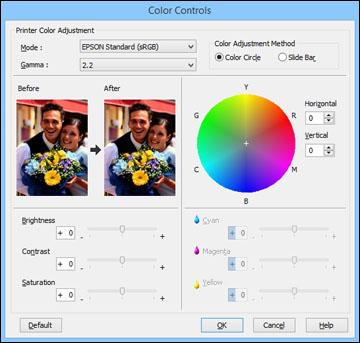
Unlocking the full potential of your smart TV often involves delving into its advanced picture modes and features. These settings are designed to enhance your viewing experience by adjusting color accuracy, contrast, and motion clarity. Many modern TVs come with modes such as Cinema, Sports, and Game. Each of these presets optimizes specific elements, such as brightness and motion handling, to suit different types of content. For instance, the Cinema mode often provides a warmer color temperature and deeper blacks, ideal for movie nights.
Beyond presets, explore features like Dynamic Contrast, which automatically adjusts the contrast levels in real-time, or Motion Smoothing, which can reduce blur during fast-paced scenes. Some TVs also offer HDR (High Dynamic Range) settings that enhance the range of colors and brightness, bringing more life-like visuals to your screen. It’s worth experimenting with these options and customizing them to your preference. Remember, some TVs allow you to create and save personalized profiles, giving you quick access to your preferred settings.
- Dynamic Contrast: Adjusts contrast levels automatically.
- Motion Smoothing: Reduces blur in fast-paced scenes.
- HDR Settings: Enhances color and brightness range.
- Custom Profiles: Save your preferred settings for easy access.
Maintaining Your TV for Long-Term Quality
To ensure your smart TV delivers stunning visuals for years to come, regular maintenance is key. Start by keeping the screen clean. Use a microfiber cloth to gently wipe away dust and smudges—avoid using harsh chemicals or paper towels that might scratch the surface. Position your TV in a well-ventilated area to prevent overheating, which can degrade picture quality over time.
- Check Firmware Updates: Manufacturers often release updates that enhance performance and fix bugs. Keeping your TV’s firmware up to date ensures optimal functionality.
- Adjust Brightness and Contrast: Properly calibrated settings reduce strain on the TV’s components, enhancing longevity and viewing experience.
- Use a Surge Protector: Protect your TV from power surges that could damage internal circuits and affect picture quality.